
Software for home inspectors
Inspect faster. Report smarter. Run the business better.
Inspecta Home 360 is the all-in-one platform built for how inspectors actually work — on mobile, in the field, with gloves on. Scheduling. Agreements. Findings. Reports. Invoices. Payments. One system.
Card required. You will not be charged until the trial ends.
The problem
You became a home inspector to help people. Not to fight software.
You're in a crawlspace at 10am. You're still at your desk at 10pm. Your scheduling tool doesn't talk to your report tool. Your report tool doesn't connect to your invoicing. Every piece of your business lives in a different app.
The average inspector spends 2–3 hours writing reports after a 3-hour inspection. That's half your working day — for free.
There's a better way to run this.
From the first lead to the final payment, Inspecta Home 360 runs with you. Inspect. Document. Generate. Deliver. Get paid. In one place.
By the time you're back in your truck, your report is nearly done. By the time you're home, you've already been paid.
From the field
How the job actually runs
Inspecta Home 360 is the software, not the inspector. These are the loops you run — open Help for the steps.
Write on the walk
Photos, notes, and ratings follow a walk-order or SOP path. The summary is mostly written before you leave the driveway.
Field writer how-to
Book from your page
Clients request an inspection or pick a live estimate and an open slot. You are not texting square footage quotes from the truck.
Booking how-to
Hold until signed and paid
The PDF stays gated until the agreement is signed and the invoice is paid. Then the client and agent open it in the portal.
Hold-until-paid how-to
Search every screen in the Help Center, or start a workspace.
Every feature exists because an inspector needed it
Tools for the job, not a generic office suite
Speed
Your report shouldn't take longer than your inspection.
Inspecta Home 360 captures your observations through voice and photos as you work, automatically building a formatted, professional report in real time. By the time you're back in your truck, you're 80% done.
- →Voice-to-findings: talk, we write
- →Auto-formatted reports as you inspect
- →Offline-ready — syncs when you're in range
Full lifecycle
Book. Inspect. Deliver. Get paid. All in one place.
Stop jumping between scheduling apps, report tools, invoice platforms, and email chains. Inspecta Home 360 covers your entire business lifecycle in one cohesive system you never have to leave.
- →Scheduling + agreements
- →Invoicing + payments
- →Team management + analytics
Field first
Built for inspectors on ladders, not admins at desks.
You work in attics, crawlspaces, and electrical rooms with gloves on and tools in your hands. Your software should work there too. Inspecta Home 360 is mobile-first, offline-capable, and fast enough that it never slows you down mid-inspection.
- →Full offline mode — syncs when back in range
- →Works on iOS and Android
- →Tap-and-voice navigation for gloved hands
Reports
Reports that make you look as good as you are.
Your report is often the only thing your client sees after the inspection. Inspecta Home 360 generates white-labeled reports with your branding, annotated photos, organized findings, and clear recommendations — formatted the way buyers, agents, and lenders actually want to read them.
- →Your logo, your brand
- →Inspecta Copilot captions you review before they print
- →One-tap digital delivery + PDF
Growth
Do more inspections. Without drowning in admin.
When reports take 30 minutes instead of 3 hours, you can take another appointment. When your team uses the same platform, quality is consistent at any scale. When payments are built-in, cash flow is predictable.
- →Standardize quality across your entire team
- →Track revenue, utilization, and lead sources
- →Built-in CRM, automation, and client follow-up
How it works
Seven steps. One platform. Zero duct tape.
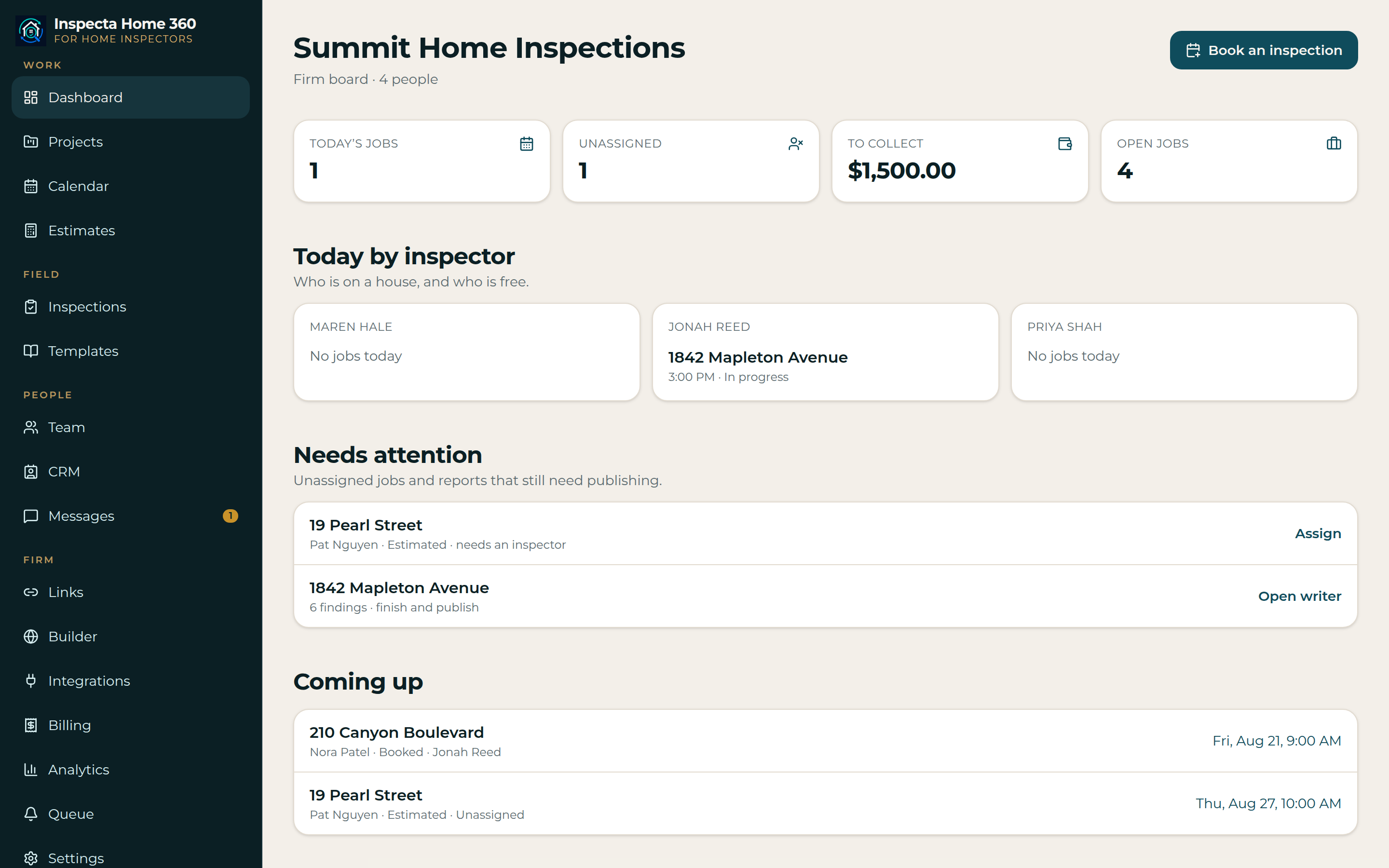
One inspector can book, walk, write, and deliver. When you add a second inspector, the office still sees the whole board.
Book the job
Send a branded website with smart pricing — square footage, age, travel, and add-ons quoted before you roll.
Inspect
Follow a walk-order path or your SOP sections. Everything you need is one tap away — no hunting through menus.
Document
Speak your findings and capture photos on-site. They sync to the job automatically, even in poor signal.
Generate
Pull from your narrative library. Inspecta Home 360 builds the formatted report as you inspect — not after.
Deliver
One tap sends a clean, branded PDF. Buyers read it. Agents can flag repair items for negotiations.
Get paid
E-sign the agreement, collect the fee, and hold the report until both are done. No more chasing.
Grow
Work alone today. Add inspectors and office staff when the calendar fills — same platform, larger team.
Integrations
Automate the office, not just the report
Team and Scale plans integrate with Secure24, HomeBinder, RecallChek, and Zapier to automate binders after delivery, appliance recalls, security offers, and the rest of your stack.
Secure24
Home-security quotes from the client portal or a staff push.
HomeBinder
Send a property binder once the report is published, paid, and signed.
RecallChek
Hand client and property details to the RecallChek appliance workflow.
Zapier
Catch Hook events and an API key to create leads from anywhere.
See it live
Open the Inspecta Home 360 workspace
Sign in with a demo owner, inspector, or client login and click through the real app. The sandbox is shared and resets every day to a baseline — Inspecta Home 360 is the software, not the inspector.
Try the live demoSample reportsWe've heard your concerns
Here's the truth.
- “I've tried inspection software before. It slowed me down.”
- Most inspection software was built for a desktop in someone's office — not for someone in a crawlspace. Inspecta Home 360 was designed from the ground up for field work: mobile-first, voice-enabled, offline-capable, and fast enough to keep up with the way you inspect.
- “AI can't replace my expertise and judgment.”
- It doesn't try to. The AI handles the writing, organizing, and formatting. You make every professional call. Your knowledge stays the most important thing in the room. Inspecta Home 360 just removes the part you don't get paid for: the typing.
- “What about my specific report format and templates?”
- Inspecta Home 360 supports fully customizable templates. Import your existing format, build from scratch, or use ours. You configure the sections, systems, components, conditions, and findings the way your business works — not the other way around.
- “What if I lose cell service mid-inspection?”
- Inspecta Home 360 works fully offline. All your data, photos, and findings are captured locally and sync automatically when you're back in range. No lost data. No interrupted workflows.
- “I run a team — will this scale for us?”
- Yes. Team accounts with role-based permissions for owners, office admins, and inspectors. Scheduling and job assignment work across your full team. Whether you have 2 inspectors or 20, one dashboard runs the whole operation.
- “Is my client data secure?”
- Each firm operates in a fully isolated workspace. Your client data, reports, and business information are never shared across accounts.
Blogs
Copilot
Grow inspection referrals without adding a second app
Keep agent relationships, client follow-up, reports, and referral history beside the inspection instead of exporting every opportunity to another CRM.
Platform
From lead to paid on one home inspection board
Turn a referral into a scheduled job, a documented inspection, a delivered report, and a collected invoice without copying the record between apps.
Try the platform built for how you actually work.
7-day free trial. Card required — you will not be charged until the trial ends. No IT setup. No long onboarding. Just faster inspections, cleaner reports, and a business that runs itself — starting with your very next job.
Built for independent inspectors and multi-inspector companies alike. Mobile-first. Offline-ready. AI-assisted. Yours.